
Google Docs™ integration
Your agreement. Automatically filled. Ready to sign.
Keep the rental agreement you've already written. Add fields for guest information, reservation details, and signatures right inside Google Docs. SignBreezy takes care of filling it in for every reservation.
Template preview
Your words. Their details. Automatically.
Sample rental agreement
SHORT-TERM RENTAL AGREEMENT
This agreement is entered into by {{guest_full_name}} for the property located at {{property_address}}.
The rental period begins on {{check_in}} and ends on {{check_out}}, for a total of {{num_nights}} nights.
The total rental amount is {{total}}.
Ready to sign
SHORT-TERM RENTAL AGREEMENT
This agreement is entered into by Jamie Carter for the property located at 1234 Palm Canyon Drive, Palm Springs, CA.
The rental period begins on November 12, 2026 and ends on November 16, 2026, for a total of 4 nights.
The total rental amount is $1,245.00.
Illustrative values. Your actual agreements use the reservation, property, and guest information collected by SignBreezy.
Three simple steps
Start with your agreement
Connect Google Drive and bring your existing rental agreement into a new document SignBreezy creates in Google Docs™.
Add your fields
Open the free SignBreezy Sidebar. Place your cursor anywhere in the document and click to insert guest details, reservation information, calculations, or signature fields.
Let SignBreezy do the rest
When a guest opens their signing link, SignBreezy fills the agreement with the relevant information and presents it for signing.
Free Google Workspace add-on
Meet the SignBreezy Sidebar.
Everything you need to make your agreement dynamic, right where you're already writing in Google Docs™.
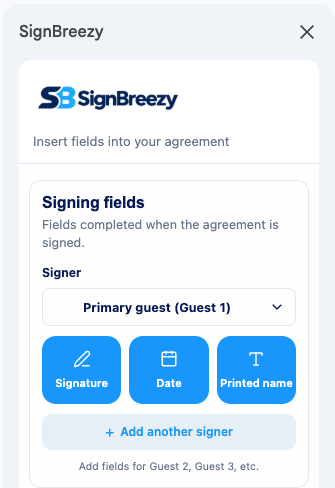
Click to insert
No copying token names — just click a field and it's placed at your cursor.
Fields for every signer
Primary guest and additional adults each get their own signature, date, and name fields.
Find any field
Search reservation, property, guest-provided, and calculated fields.
Every reservation, automatically personalized.
Once your document is connected, SignBreezy merges each new reservation into it — no copy-pasting, no rebuilding the agreement by hand.
Reservation details
Dates, nights, rates, and fees pulled from the booking.
Guest-provided information
Names, contact details, and anything else you ask guests to fill in.
Your formulas
Calculations you define from reservation, property, and guest data.
Beautiful on any screen.
A Google Docs™ agreement reflows to fit whatever device your guest is signing on. Text shrinks and wraps to the screen, so there's no pinching or scrolling side to side the way there can be with a fixed-layout PDF.
Need to preserve an exact layout instead — letterhead, a signature block in a specific spot, a form you can't reflow? Upload a PDF instead.
Screenshot or video — mobile signing experience
Write your agreement once. Use it for every reservation.
Keep the language and formatting you've already created. SignBreezy handles the reservation details, collects the signatures, and delivers the completed agreement.