
Free Google Workspace add-on
Build your template right inside Google Docs™.
The SignBreezy Sidebar adds signing and merge fields to any document in Google Docs™. Click a field, drop it where it belongs, and turn the agreement you already use into a data-driven SignBreezy template.
Signing fields for every guest
Add signature, date, and printed-name fields for the primary guest, then add another signer for each additional adult.
Search or browse merge fields
Reservation, property, guest-provided, and formula fields are grouped and searchable, so you're never guessing at a field name.
Not yet listed on the Google Workspace Marketplace — sign up above and we'll let you know the moment it's live.
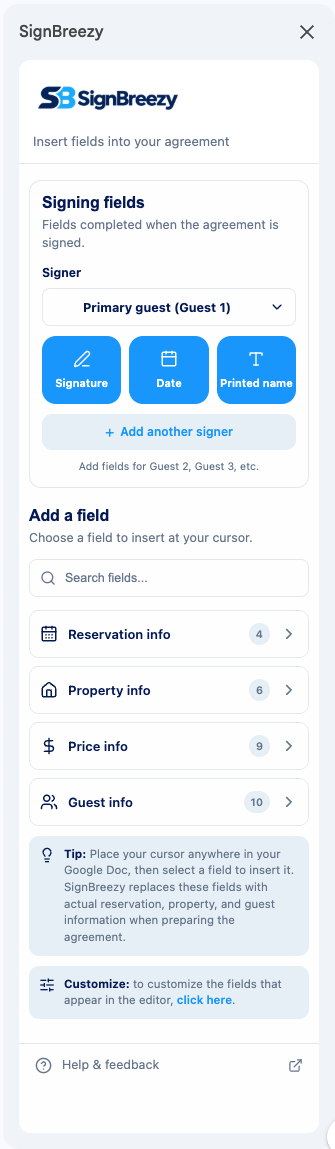
Four kinds of fields, all in one place.
Click a field to insert it at your cursor. Every field becomes a token that SignBreezy fills in automatically when an agreement is sent.
Reservation
Check-in and check-out dates, nights, rates, taxes, fees, and totals pulled from the booking.
Property
Address, door codes, and other details you've set up for the property.
Guest provided
Names, contact information, and anything else you ask guests to fill in.
Formulas
Values you calculate yourself from other fields, like a nightly average or a multi-line total.
How it works.
- 1
Open the sidebar
Install the free add-on, then open it from the Extensions menu in any document in Google Docs™.
- 2
Click to insert
Browse or search signing and merge fields, then place your cursor in the document and click a field to insert it.
- 3
Make it your own
Arrange fields, add your own wording, and format your document however you like. Your template stays fully editable in Google Docs.
Free with every SignBreezy plan.
The Sidebar doesn't send your document content anywhere — it only inserts the fields you click on, right where you place them.
The Sidebar is covered by SignBreezy's Privacy Policy and Terms of Service.